Aller au contenu
View in the app

A better way to browse. Learn more.

Fallout Génération

A full-screen app on your home screen with push notifications, badges and more.

To install this app on iOS and iPadOS
  1. Tap the Share icon in Safari
  2. Scroll the menu and tap Add to Home Screen.
  3. Tap Add in the top-right corner.
To install this app on Android
  1. Tap the 3-dot menu (⋮) in the top-right corner of the browser.
  2. Tap Add to Home screen or Install app.
  3. Confirm by tapping Install.

Forum non accéssible visible sur la page d'acceuil

tout est dans le titre


image pour illustré
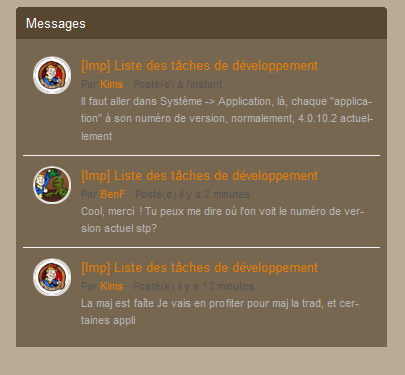
pb.png

Retour utilisateur

Commentaires recommandés

Posté(e)

Modification de Statut en En attente

Effectivement, je fais remonté à IPB si sa pas déjà été fait :)

HawK-EyE

Citoyen
Posté(e) (modifié)

C'est normal qu'ils apparaissent pour toi car tu as les droits d'accès.

Ce qu'il faut c'est vérifier si ces messages apparaissent si on est non logué (invité).


Modifié par HawK-EyE

Invité

Invité

Visiteur
Posté(e)

c'est pareil même déconecté

HawK-EyE

Citoyen
Posté(e) (modifié)

Ah donc il faut corriger, merci :)

Modifié par HawK-EyE

HawK-EyE

Citoyen
Posté(e)

Je pense que ce problème est résolu désormais.

Account

Navigation

Rechercher

Rechercher

Configure browser push notifications

Chrome (Android)
  1. Tap the lock icon next to the address bar.
  2. Tap Permissions → Notifications.
  3. Adjust your preference.
Chrome (Desktop)
  1. Click the padlock icon in the address bar.
  2. Select Site settings.
  3. Find Notifications and adjust your preference.