



Aller au contenu
View in the app

A better way to browse. Learn more.

Fallout Génération

A full-screen app on your home screen with push notifications, badges and more.

To install this app on iOS and iPadOS
  1. Tap the Share icon in Safari
  2. Scroll the menu and tap Add to Home Screen.
  3. Tap Add in the top-right corner.
To install this app on Android
  1. Tap the 3-dot menu (⋮) in the top-right corner of the browser.
  2. Tap Add to Home screen or Install app.
  3. Confirm by tapping Install.

[Charte Graphique] Citations illisibles lors de l'écriture de messages

Je sais pas si ça le fait partout, mais en tout cas pour les commentaires de bugtracker, quand je veux citer quelqu'un ça donne ça :
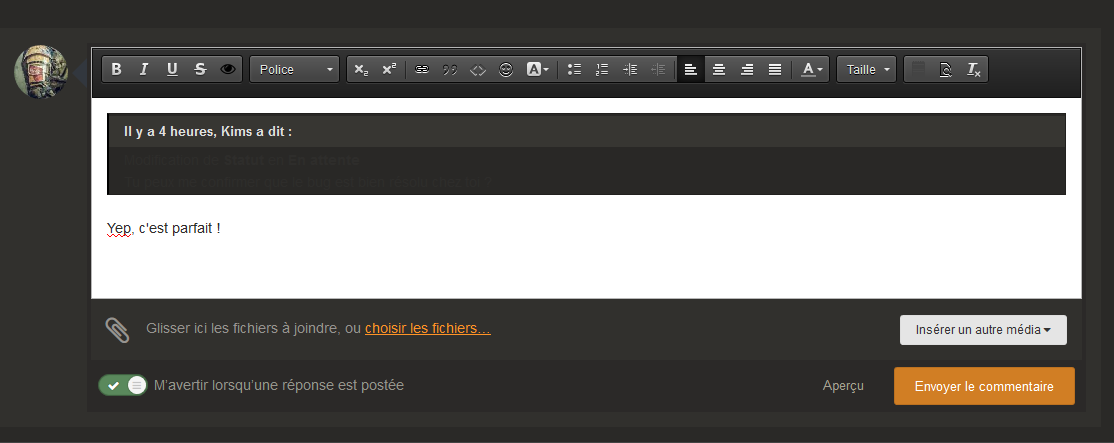
 

image.thumb.png.9abf83bc9ec05975c0d69abf625a020d.png


L'écriture est sombre sur un fond sombre, du coup on peut pas lire


EDIT : après vérification, ça me le fait aussi sur le forum

Modifié par V42

Retour utilisateur

Commentaires recommandés

Posté(e)

Modification de Statut en En attente

Très certainement un problème de couleur de texte non differencié lors de quote, j'y regarde ce soir

Dr Gast

Citoyen
Posté(e)

Les spoilers pareil : pour corriger le test de Hekan dans une balise spoiler, j'ai dû mettre son texte en blanc.


Posté(e)

Je viens de faire des corrections sur les deux, vous pouvez me confirmer que c'est résolu ?

V42

Citoyen
Posté(e)

Oui, je confirme pour les citations, c'est lisible maintenant


Dr Gast

Citoyen
Posté(e)

Idem.

Account

Navigation

Rechercher

Rechercher

Configure browser push notifications

Chrome (Android)
  1. Tap the lock icon next to the address bar.
  2. Tap Permissions → Notifications.
  3. Adjust your preference.
Chrome (Desktop)
  1. Click the padlock icon in the address bar.
  2. Select Site settings.
  3. Find Notifications and adjust your preference.