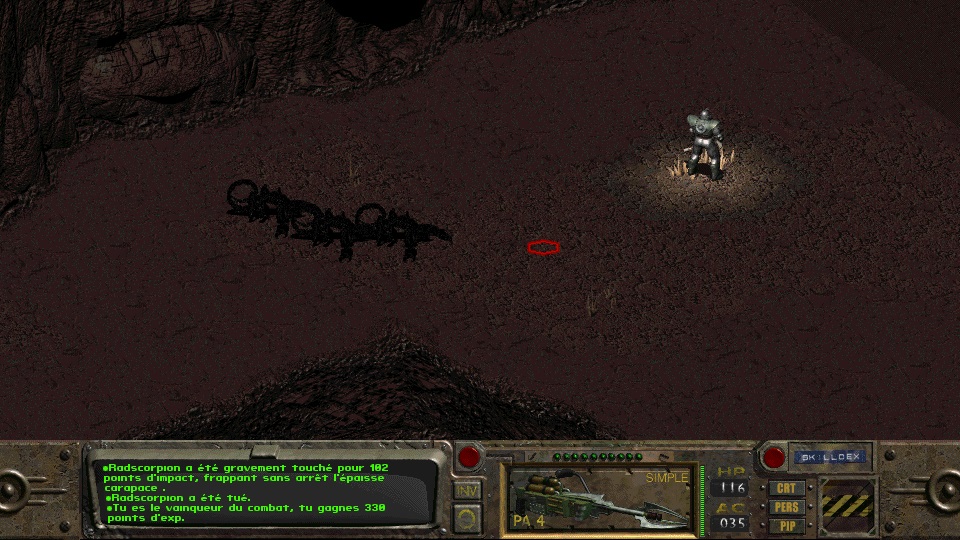
Un espace avant le point final.
HawK-EyE Citoyen Posté(e) le 30 juin 201511 a Author stats Encore une construction bizarroïde, l'espace n'existe pas : combat.msg {5605}{}{, frappant sans arrêt l'épaisse carapace}
BenF Superviseur (Admin) Posté(e) le 30 juin 201511 a Author stats Sur ma version j'ai bien l'espace, étonnant. On doit pas avoir exactement la même. Ca m'inquiète un peu.
HawK-EyE Citoyen Posté(e) le 30 juin 201511 a (modifié) Author stats L'espace tu le vois dans le jeu ou sur le combat.msg ?? Tiens pour comparer : COMBAT.MSG Modifié le 30 juin 201511 a par HawK-EyE
BenF Superviseur (Admin) Posté(e) le 30 juin 201511 a Author stats Dans les deux justement. Ce qui veut dire qu'on a pas exactement la même version.
HawK-EyE Citoyen Posté(e) le 30 juin 201511 a (modifié) Author stats Fait un winmerge entre ton fichier et mon fichier on verra bien ou sont les diff Modifié le 30 juin 201511 a par HawK-EyE
BenF Superviseur (Admin) Posté(e) le 30 juin 201511 a Author stats J'ai fait, j'ai plein d'espace en plus sur mon fichier TON_FICHIER_COMBAT.MSG MON_FICHIER_COMBAT.MSG
HawK-EyE Citoyen Posté(e) le 30 juin 201511 a (modifié) Author stats Alors remplace le tien par le mien et on en parle plus Dans la version en téléchargement ya pas les espaces. Modifié le 30 juin 201511 a par HawK-EyE
BenF Superviseur (Admin) Posté(e) le 30 juin 201511 a Author stats Oui, j'ai du choper une version entre deux corrections.






Commentaires recommandés
Rejoindre la conversation
Vous pouvez publier maintenant et vous inscrire plus tard. Si vous avez un compte, connectez-vous maintenant pour publier avec votre compte.
Remarque : votre message nécessitera l’approbation d’un modérateur avant de pouvoir être visible.