



Aller au contenu
View in the app

A better way to browse. Learn more.

Fallout Génération

A full-screen app on your home screen with push notifications, badges and more.

To install this app on iOS and iPadOS
  1. Tap the Share icon in Safari
  2. Scroll the menu and tap Add to Home Screen.
  3. Tap Add in the top-right corner.
To install this app on Android
  1. Tap the 3-dot menu (⋮) in the top-right corner of the browser.
  2. Tap Add to Home screen or Install app.
  3. Confirm by tapping Install.

VAX the glow - manque nom

En téléchargeant les données à partir de l'ordinateur VAX vers notre pip-boy, je remarque qu'il n'y a pas de nom d'afficher pour une des informations (à propos de la super armure). On peut consulter les infos de la super armure en cliquant sur la zone de texte vide.
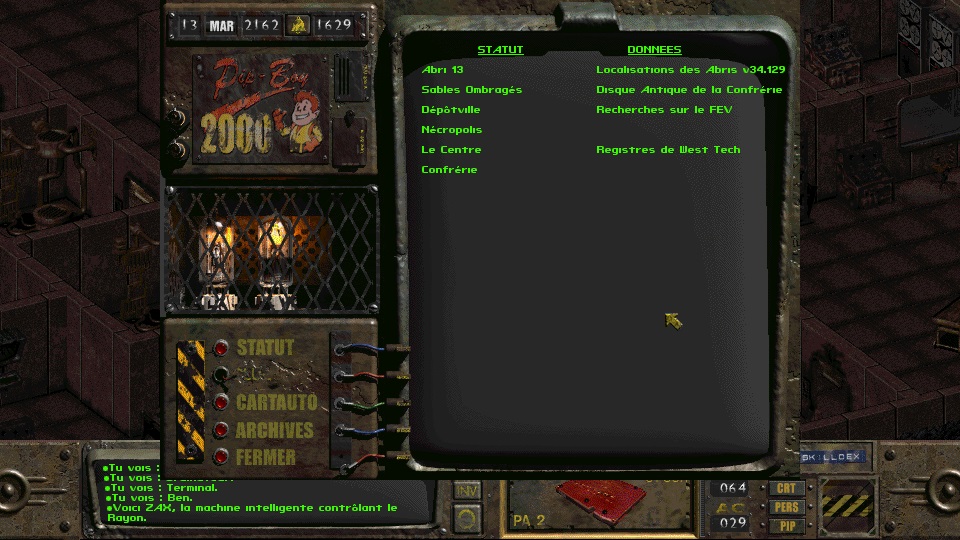
scr00017.jpg

Retour utilisateur

Commentaires recommandés

HawK-EyE

Citoyen
Posté(e) (modifié)

Oui, mais on dirait que ça aurait pas dû apparaitre.

Je met dans "corrigé" mais faudra en parler à Sduibek


pipboy.msg

{414}{}{Doc. Tech. SuperArmure} # Power Armor Specs was here, is now a dialog sequence.  -Sduibek


PIPBOY.MSG

Modifié par HawK-EyE

Rejoindre la conversation

Vous pouvez publier maintenant et vous inscrire plus tard. Si vous avez un compte, connectez-vous maintenant pour publier avec votre compte.
Remarque : votre message nécessitera l’approbation d’un modérateur avant de pouvoir être visible.

Invité
Ajouter un commentaire…

Account

Navigation

Rechercher

Rechercher

Configure browser push notifications

Chrome (Android)
  1. Tap the lock icon next to the address bar.
  2. Tap Permissions → Notifications.
  3. Adjust your preference.
Chrome (Desktop)
  1. Click the padlock icon in the address bar.
  2. Select Site settings.
  3. Find Notifications and adjust your preference.